
Appearance
Entering a plot: entry protection, stashed items and kept items
You'll learn: what happens when someone walks in, what you can and can't do to them, and when. You'll need this when: your plot hurts, moves, equips or kills players. (So: almost always.)
Status: Built (headless, and in the plots dev stack): the 10 s entry protection, the start countdown, stashed items, tried-out and kept items, soft death, Leave. The plots dev page and the iOS app draw the protection ring, the countdown, the "keep your items?" sheet and "Leave {plot}" in the settings menu. Not in the live world yet.
The timeline
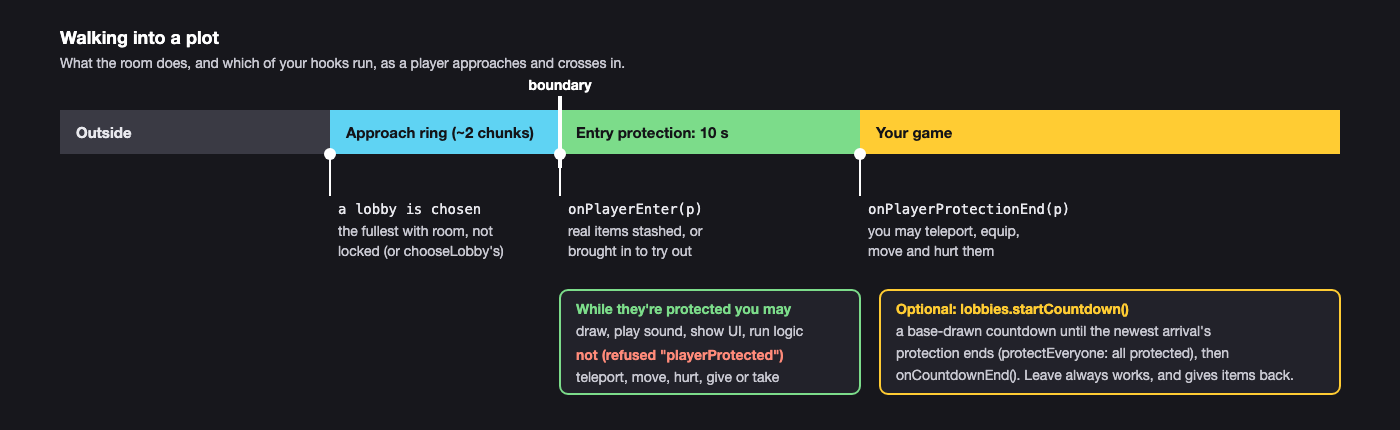
Arriving by portal
A game plot has a portal of its own, inside it: an ordinary destination portal on Explore's map and feed (and a blue travel portal by the spawn that leads to it), standing where the runtime says arrivals stand, world.setArrival(pos, yaw?) at plot level (Team Minigame: its lobby area, once the map stands; without it, just inside the plot by its monument). Coming out of it is the same as walking in: the room chooses your lobby as you arrive, sets your items aside, and your 10 s entry protection starts. Leave puts them back where they came from.
Entry protection (10 seconds, every plot)
For 10 s after anyone enters (walking in, a portal, a teleport), these calls on them are refused with rule playerProtected (R4 in the design docs):
players.teleport, setMovement, setCamera, playCameraPath, damage, setHealth, respawn, give, take, clearInventory. Their input isn't yours to capture either.
You can draw, play sound, show UI and run your own logic around them. The base game draws a shimmer and a ring counting down. Walking in is always safe: everyone gets 10 s to look around and leave. It's the same everywhere, and plots can't change it.
ts
export function onPlayerEnter(p: PlayerId) {
  ui.showTitle(p, "Welcome to the Crypt");      // fine while they're protected
}
export function onPlayerProtectionEnd(p: PlayerId) {
  players.give(p, "crypt:torch", 1);            // now it's allowed
}
Not sure? players.get(p).protectionSecondsLeft is the seconds left. Don't catch the refusal as a check: a refused call costs far more than a successful one.
The start countdown (optional)
A round that should start fair can use the base game's countdown: lobbies.startCountdown(opts?) (runtime only).
- It runs until the newest member's entry protection ends (or
opts.minSeconds, if later). The base game draws it ("Starting in 10"), synchronised for everyone. - Players still in their entry protection stay protected until it ends. With
{ protectEveryone: true }, every member is protected until it ends, including those who've been in a while: an equal start. - Then your
onCountdownEnd()runs, and the round is yours: teleport them to the arena, give kits, start your own 3, 2, 1.
If someone leaves during the countdown, you get onCountdownPlayerLeft(p): call startCountdown() again, cancelCountdown(), or let it run.
ts
export function onPlayerEnter(p: PlayerId) {
  const l = lobbies.current();
  if (l.players.length >= l.size && !l.locked) { lobbies.lock(); lobbies.startCountdown({ protectEveryone: true }); }
}
export function onCountdownEnd() { /* teleport, kits, go */ }
Without protectEveryone, players who entered early and whose protection has ended are yours to manage while the others arrive (parkour, practice). Many plots need no countdown at all; see Lobbies.
Stashed items: your game, your gear
A runtime declares "stashItems": true or false in plot.json.
Stashing (most games, R6): as a player crosses in, their real inventory, their real body (health, XP, death) and their abilities (flight) are set aside. Inside, they have only what you give them, and only plot health. When they leave, by any route, their real self comes back exactly as it was. (A plot that doesn't stash leaves flight on. Admin creative is off in any plot, for now.)
- No prompt: you're not touching their real self at all.
- Kill them freely; give kits; keep their progress in your storage, as a website keeps its own data.
Not stashing (R7): players bring their real items and body. Then they choose:
| Trying things out (default, no prompt) | Keeping their items (one base prompt) | |
|---|---|---|
| Their real inventory | in play, then put back as it was when they leave | in play; changes stick |
| Death inside | soft: back outside at the entry point | real, under base rules |
| You can | read player.keepsItems, refuse features to those trying things out |
You may ask with players.askToKeepItems(p) (runtime only). The base game shows a sheet, "Keep your items in {your plot's name}?", with "Keep my items" and "Just try it". The answer arrives in onKeepItemsAnswer(p, keepsItems). You can't draw, style, pre-answer or force it, and saying no never blocks anything else.
| Stashed | Not stashed, trying out | Not stashed, keeping items | |
|---|---|---|---|
| Prompt | none | none | one, base-drawn |
| Good for | Bedwars, shooters, Among Us, a story game with its own saves | duels: bring your strength, nothing sticks | your own gear, for real |
Deaths
Inside a plot, death is yours to define. Return true from onPlayerDeath (runtime only) and do your own respawn:
ts
export function onPlayerDeath(p: PlayerId, by: PlayerId | null): boolean {
  players.respawn(p, TEAM_SPAWN);
  return true;
}
Return false (or don't export it) and it's a soft death: the player is put back outside at your entry point (or the nearest point outside), with no base penalties. A plot can't follow, trap or loop-kill anyone.
Leaving
Leave is always one tap away: "Leave {your plot}", the first item of the settings menu, whose button is always on screen. It works instantly, whatever your plot is doing. You get onPlayerLeave(p, reason) with "walked" | "leave" | "death" | "disconnect" | "moved" | "plotShrank" (the monument's plot shrank under them), and the room gives back the stashed items or puts back what they tried out. You can't stop it, and you don't need to clean up their inventory.