
Appearance
Guide: importing a glTF level
You'll build: a plot whose ground is a 3D level from Blender, Unity, Unreal or Godot. You'll use: mesh terrain, glTF scene import, engine collision and LODs. Status: the pieces are Built (the glTF subset reader, scene import, chunking, LODs, triangle collision, renders), and a level placed by code runs in the plots dev stack: the sample plot/samples/gltf-level is drawn with LODs, lit like the blocks, and walked on its real triangles (smooth slopes) by the page as by the room. Declaring a level in plot.json and baking it at publish are Planned.
What you get
- Any terrain. Caves, overhangs, planets, a cathedral. Not just blocks.
- Collision for free. The engine derives it from your mesh (a triangle BVH per chunk), or uses a simplified collision mesh you supply. The base walk, raycasts and every controller collide with it: the room and the page walk the same triangles, so ramps are smooth slopes, not block steps.
- One lighting. Your meshes and props are lit by the world's lighting like the blocks round them: dark in a cave, lit by a torch.
- LODs for free. The engine makes 2 to 3 simplified levels and an impostor when you publish, so the level shows from far away on a cheap phone.
- Continuity. Because the engine knows where the ground is, it can run the 10 s entry walk on your terrain and find solid ground for Leave.
The pipeline
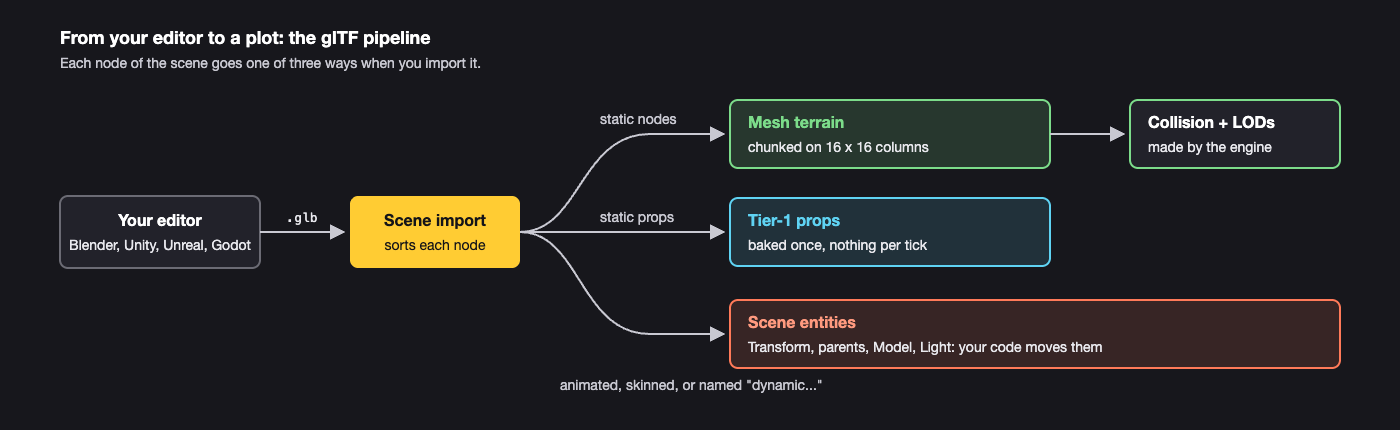
A node becomes an entity if an animation targets it, it has a skin, its name starts with dynamic (any case), or its extras say dynamic: true. Its children come along. Everything else is static.
Materials: PBR base colour and emissive map onto the engine's node materials; custom shaders need re-authoring as node graphs. Lights come from KHR_lights_punctual.
Try the pieces today

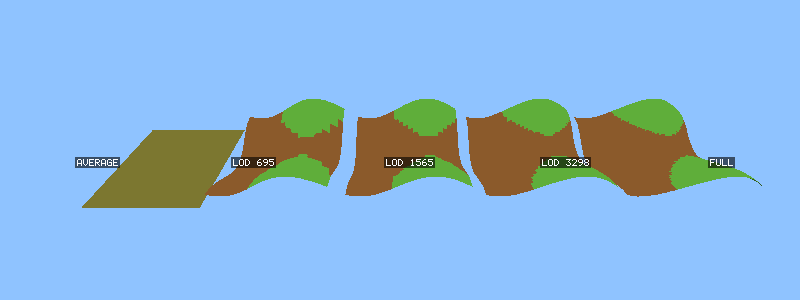
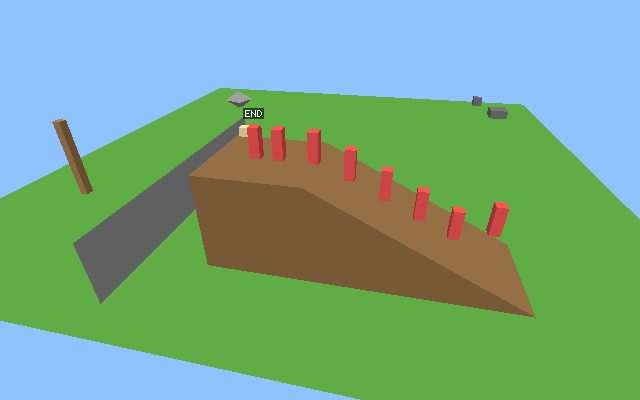
Renders from the runtime's own tests (plot/test/out/).
The runtime's tests import a sample level, chunk it, build LODs, walk a player up its ramp and render it:
sh
node --test plot/test/gltf.test.mjs plot/test/gltf-terrain.test.mjs plot/test/gltf-collision.test.mjsThe renders land in plot/test/out/ (gltf-sample-level.png, gltf-terrain-lods.png, collision-ramp-walk.png). The libraries:
| Module | Does |
|---|---|
plot/gltf/glb.mjs | reads and writes the glTF subset (.gltf, .glb) |
plot/gltf/scene-import.mjs | `importScene(gltf, { mode: "terrain" |
plot/gltf/terrain.mjs | chunkTerrain, buildLods, averageColour |
plot/gltf/collision.mjs | CollisionWorld: raycasts, overlaps, moveAndSlide, findGround |
In a plot (Planned shape)
Static content is declared in plot.json and baked at publish:
json
{
  "kind": "runtime", "namespace": "temple", "assets": "assets",
  "content": { "terrain": [{ "level": "levels/temple.glb", "at": [0, 0, 0], "collision": "levels/temple_collision.glb" }] }
}
The content field exists in the manifest today, but its entry format isn't fixed yet. Treat the shape above as a sketch. Today, place a level from code, as the sample does: import it ahead of time (plot/samples/gltf-level/import-level.mjs), then at plot level register the meshes with assets.create and publish each chunk into the shared base with world.replaceTerrainChunk; dynamic nodes become entities.
Changing terrain while the plot runs is the same host call (Built, budgeted):
ts
world.replaceTerrainChunk({ cx: 2, cz: 3, mesh: assets.create("mesh", crater) }); // crater: { positions, indices, colors }Each replacement is budgeted (about 64 K triangles a second on Low), the latest wins, and the engine makes a cheap LOD for it.
Porting a whole game
| Part | Effort |
|---|---|
| Levels and props | cheap: export glTF |
| Textures and materials | cheap to moderate: PNG or KTX2; PBR maps automatically |
| Characters and animation | cheap to moderate: skinned glTF and clips |
| Input, camera, UI | moderate: our input events, a camera per player, ui.drawOverlay or native UI |
| Game logic | real work: compile it to wasm (TypeScript, Rust, C, C++, C#, Zig) against the host API |
| Multiplayer | real work for a single-player game: decide what the room referees |
Code written against a big engine's runtime (Unity's C#, Unreal's C++) has to be separated from that runtime. A small-library or custom-engine game ports far more easily. See Other languages.